StayPeek
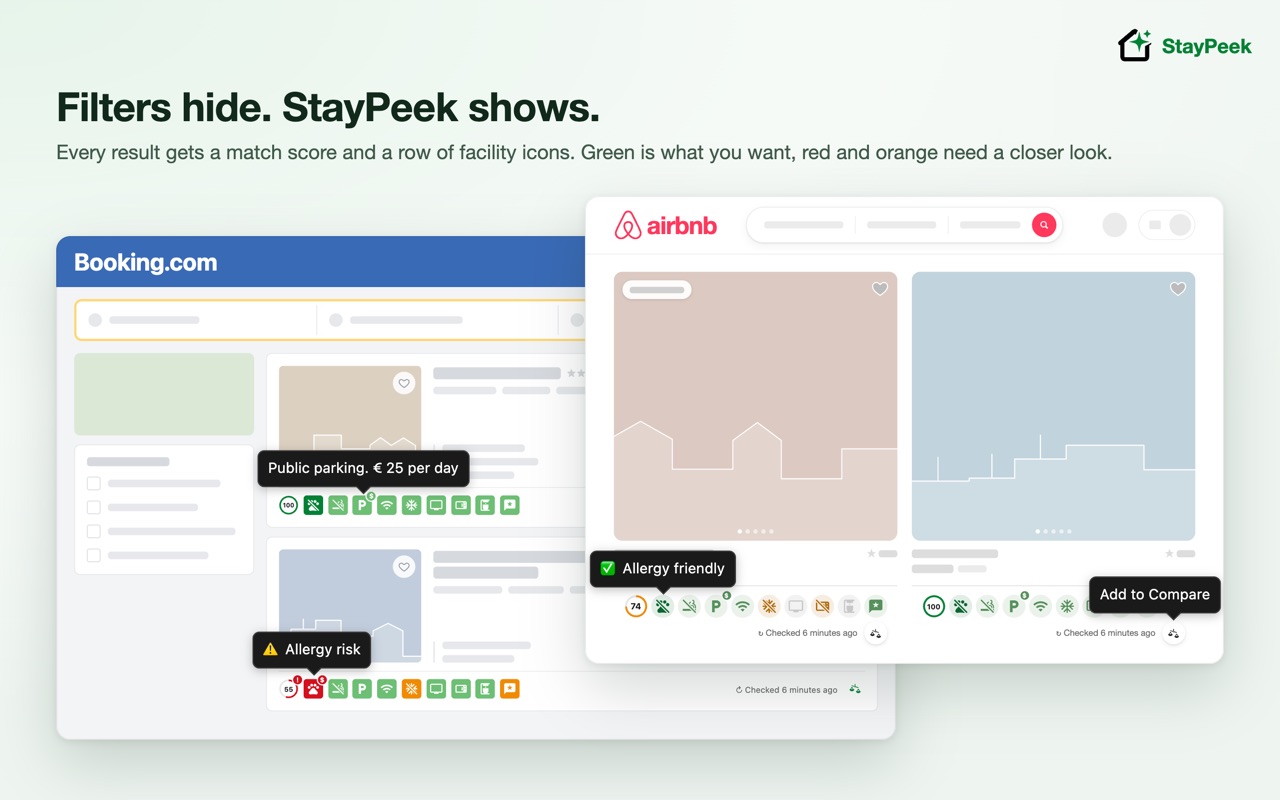
Filters hide. StayPeek shows.
Stop opening every property page to check the details. StayPeek is a free Chrome extension that puts facility icons and a match score on every booking.com and Airbnb search result, showing whether a place allows pets or smoking, has free or paid parking, WiFi, a kitchen, air conditioning and more. Search both sites at once, save the best hotels, apartments and vacation rentals to a list and compare them side by side and on a map for your dates.
Booking.com has a "pets allowed" filter but no way to exclude pet-friendly places. That gap matters if you or your family have pet allergies, so StayPeek was built to fill it, and it works for any facility you care about. On Airbnb, each listing shows its pet policy the same way.
Now on Airbnb too
- Allow Airbnb with one click, in the StayPeek popup, on the Welcome page, or from Search stays and Compare. Chrome asks a single time and it covers every Airbnb site. Until you allow it, StayPeek reads nothing from Airbnb.
- Airbnb search results (Homes and Hotels), map pins and listing pages get the same facility icons and match score, in Airbnb's own style. Under a listing's photos a strip adds a button to save it to a compare list.
- Check facilities reads one listing per click, so you decide what gets loaded.
What booking.com's filters can't do
A filter only keeps places that state a facility, so it can't tell "no" from "not mentioned". Places that never mention it disappear, even when they would suit you. StayPeek keeps every result in view and marks what each property says, and what it doesn't.
- Pets: there is "Pets allowed", but no way to exclude pet-friendly places.
- Parking: just "Parking", with no free or private parking option.
- Kitchen: "Kitchenware" and "Shared kitchen", but no private kitchen.
- No filter at all: carpeting, soundproofing, interconnected rooms, staff language.
What it does
- A row of icons for the facilities you track on every search result, on map cards and under the photos of every property page, on booking.com and Airbnb.
- A match score on each checked property, with important facilities counting more and a red ! on any dealbreaker. On the maps of both sites, price pins show the score too.
- Colours that tell you whether a place fits: green matches what you want, red clashes, orange means the site doesn't say. Missing information is never treated as "not available", so a place is never shown as safe just because its page is silent.
- Badges for details: $ means it costs extra, ? means the site doesn't state it, and a slash means the property says it is not available.
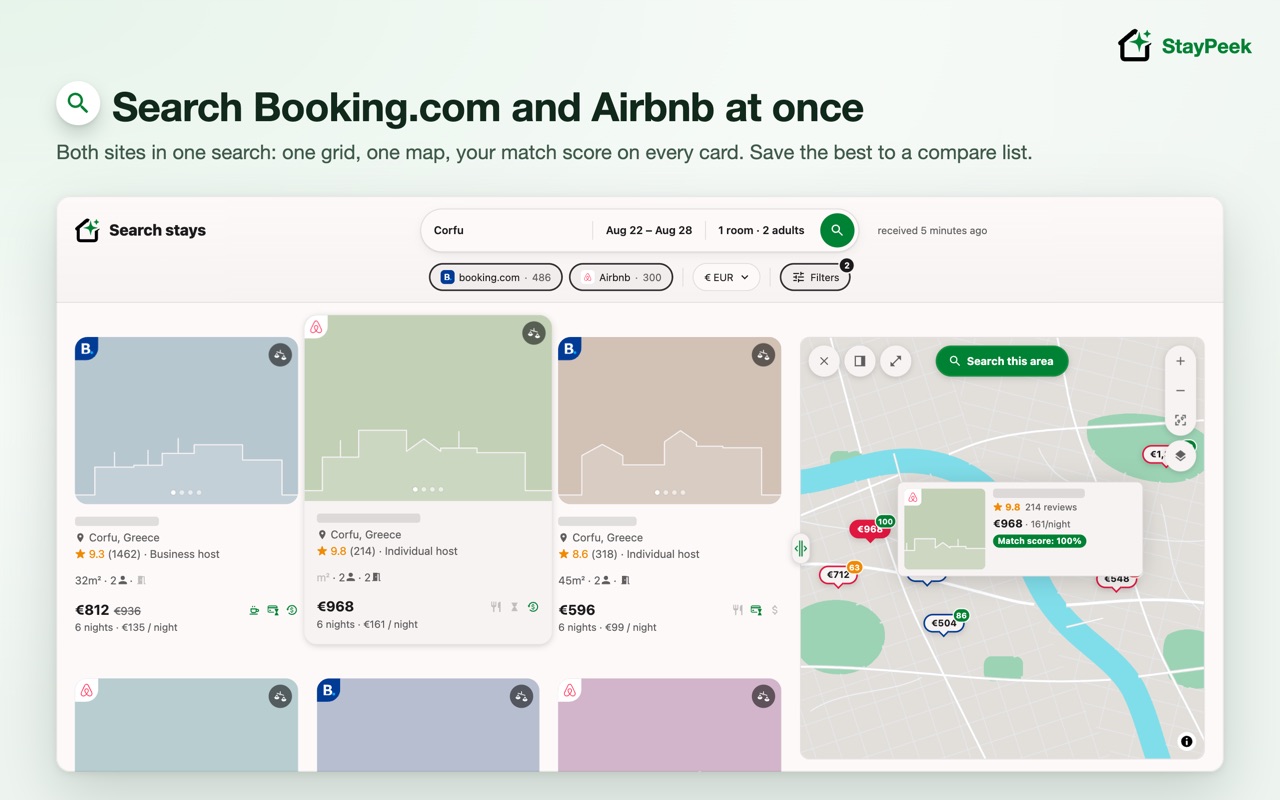
Search booking.com and Airbnb at once
- Search stays in the StayPeek tab opens a search page: pick a destination (places are suggested as you type), dates and guests room by room.
- One grid of cards from both sites, each with its site's logo: the total with nights and price per night, rating, host type, size, beds, free cancellation and pay-later terms and your match score. A map with price pins sits beside it, and the places of a site that is still answering show as placeholders that fill in.
- Filters for both sites: type of place, price, bedrooms, amenities (or your checklist's must-haves), rating and more, including Airbnb's private room, self check-in and accessibility features, with a switch to turn either site's own filters off. Pan the map and press Search this area.
- One currency chip converts every price. Airbnb prices show in the currency you pick, and your own Airbnb currency stays as it was.
- Search history and your last search are one click away. Open Search stays from a booking.com page and it starts with that page's destination, dates and guests. Save any card to a compare list from its photo.
- Without Airbnb allowed, the search runs on booking.com alone, and an Allow Airbnb card above the results lets you add it.
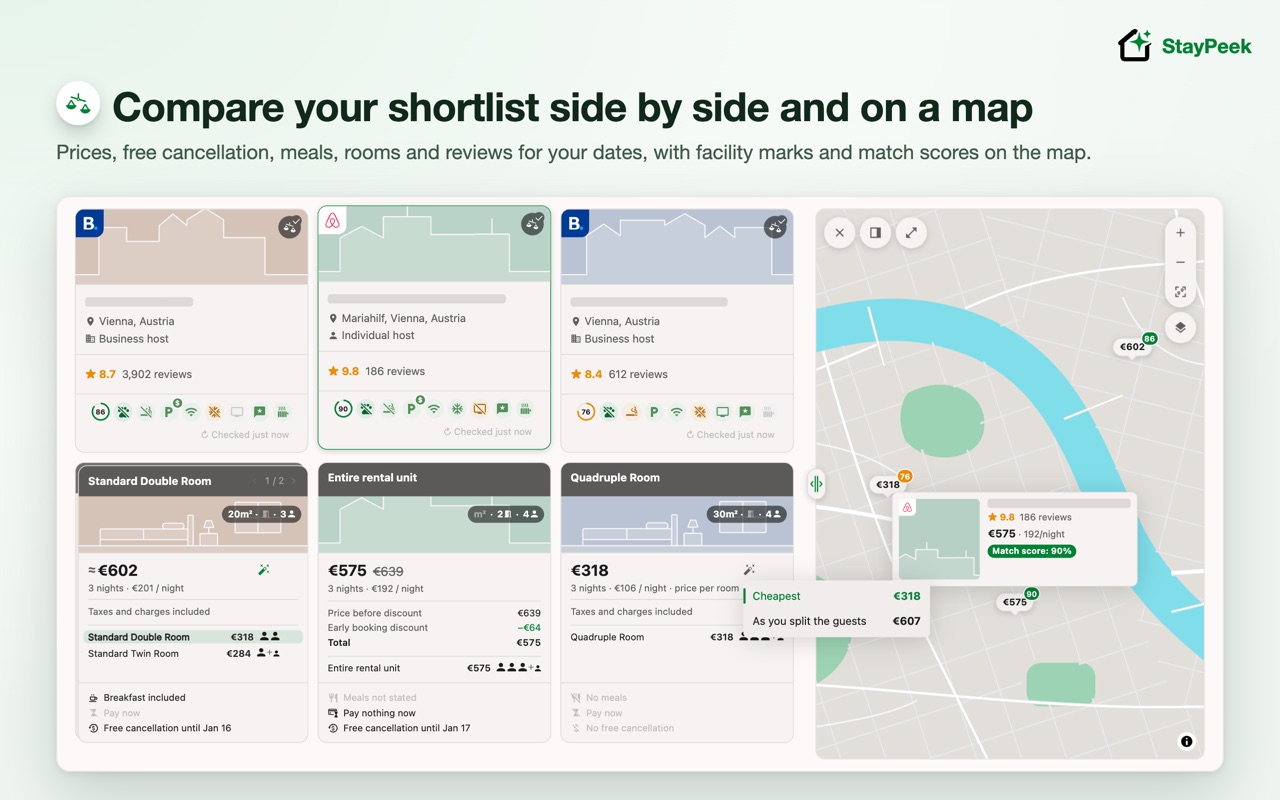
Compare your shortlist
- Save booking.com and Airbnb stays from search results, the search page, the map or a listing page into lists. The first one is named after your destination, lists show their cities, and lists for other places fold away.
- Compare them side by side for your dates and guests, both sites in one list: prices in one currency you pick, meals, payment and free cancellation worded the same everywhere, discounts (including Airbnb's weekly discount and its "Add a night" tip when the host's rate has one), room and apartment options, review scores and your facility marks.
- Filter for free cancellation, breakfast included or rooms that sleep everyone, and hide sold-out stays or stays nothing matches. "Fetch all" loads the saved properties one at a time, at a gentle pace. Recent stays brings back the dates and guests of a past search in one click.
- Set who sleeps in which room, then pick the cheapest rooms that fit everyone or the cheapest that keep your split together. When one room doesn't sleep everyone, add more and see the total with city tax. "Continue on booking.com" opens the property with those rooms already selected.
- Your shortlist on a map: price pins show each stay's match score. Click a pin on the search or compare map to see the stay's card over the map, with its photos, save button and price, and the full-screen map stays open. In compare, hovering a pin shows its photo, rating and price per night, and the matching column lifts. Pick the map style and which landmarks show, dock it above, beside or to the left of the table, or expand it over the page.
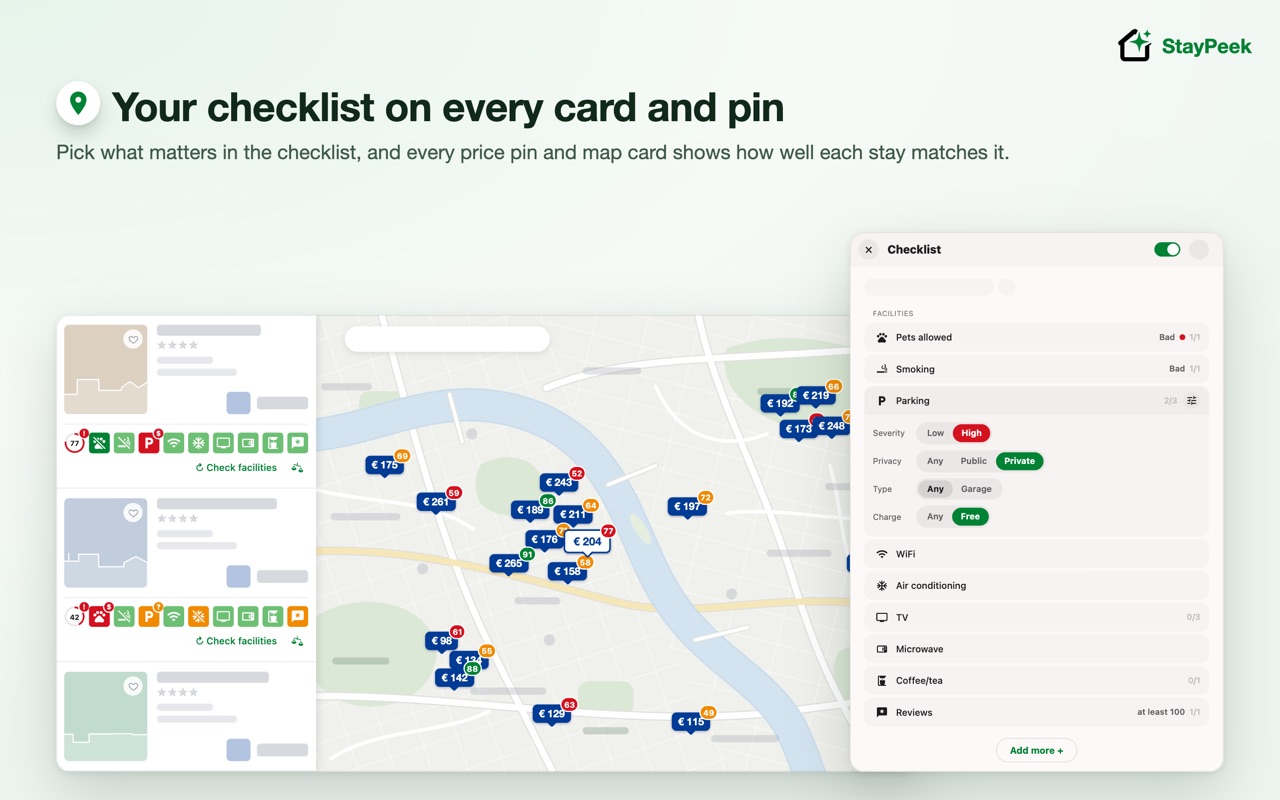
Your checklist, on every card and pin
- A small StayPeek tab on the right edge of booking.com and Airbnb opens your Checklist, Search stays, Compare and Feedback (report a bug, request a feature or something else), so you never leave the page. Drag it up or down if it covers something.
- 60+ facilities to choose from: mark pets or smoking as wanted or avoided, require free parking, ask for a private or shared kitchen or bathroom, pick staff languages, views or a review range, and choose how loudly a mismatch stands out.
- Ready-made templates (Default, Allergy, Self-catering, Remote work, Family) and your own, synced with your Chrome profile.
- One switch in the checklist hides the icons and scores everywhere without turning StayPeek off.
- Open booking.com's room photos in StayPeek's large gallery, or show all of a room's photos in one grid.
Your way
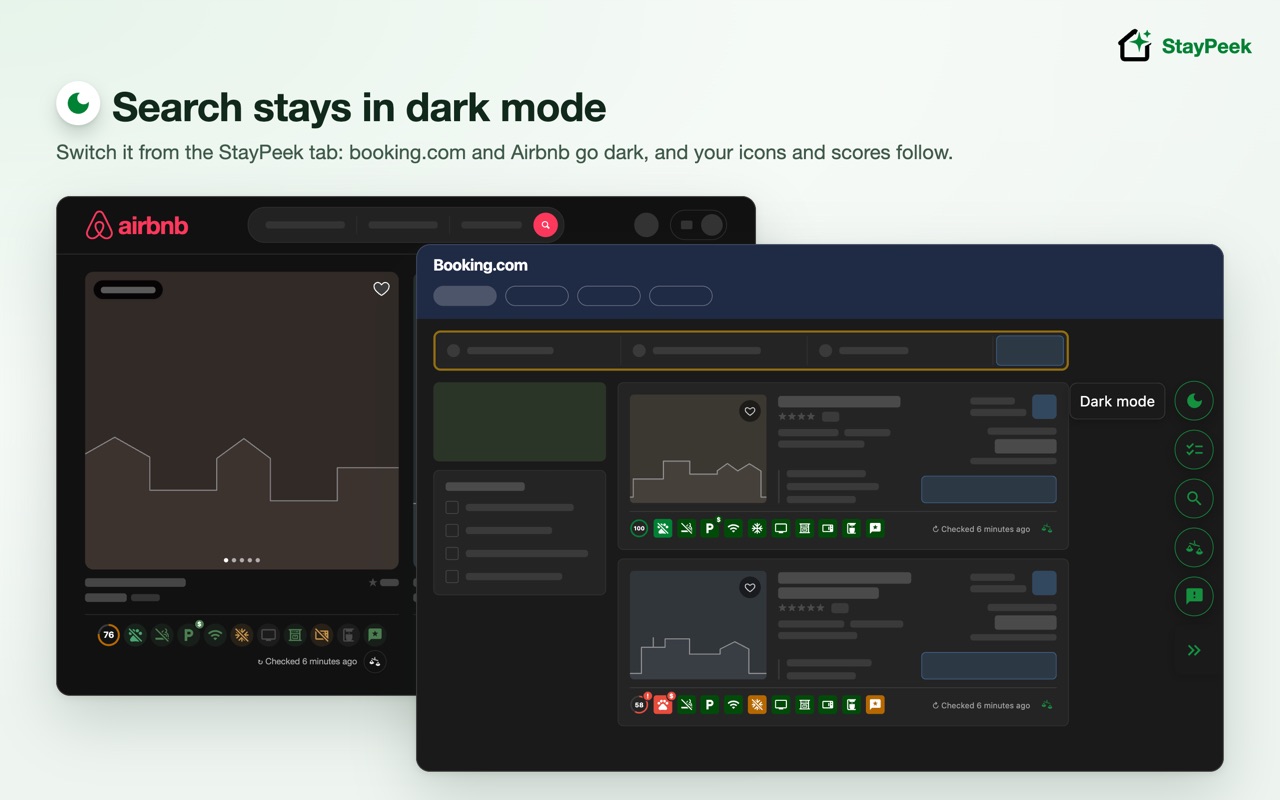
- Dark mode for booking.com and Airbnb: the theme button in the StayPeek tab also puts the booking.com home page and the search and property pages StayPeek marks, and, once you allow Airbnb, Airbnb pages, in a dark theme drawn by StayPeek. You can limit it to StayPeek's own screens in Settings.
- Small, medium, large or hidden icons, a match score as a number, a small or large ring or hidden, zoom, and an on/off switch that removes everything StayPeek adds to booking.com and Airbnb.
- Available in English, Czech, Dutch, French, German, Italian, Polish, Russian, Spanish and Ukrainian. It follows booking.com's or Airbnb's language, or keeps the one you pick.
- Free, with every feature and no sign-up.
How to use
- Install StayPeek. A short welcome guide helps you pin it, pick a template and, if you like, allow Airbnb.
- Search on booking.com or Airbnb as usual. For Airbnb, press Allow once, in the popup or on the Welcome page. Icons appear under each result; hollow icons mean the property hasn't been checked yet.
- Press "Check facilities" on a result to fill in its icons and score; on booking.com, opening the property fills its row in on its own.
- Open the StayPeek tab on the right edge of the page, choose Checklist and then Customize to change which facilities are shown.
- Press the bookmark on a result or property page to save it to a list, then open Compare from the StayPeek tab to see your saved places side by side.
- Or open Search stays from the StayPeek tab to search booking.com and Airbnb at once.
No extension can promise an allergy-free stay: "no pets" in the house rules says nothing about earlier guests or the owner's own animals, so ask the property or host when it matters.
Questions
Does booking.com have a "no pets" filter?
No. It has "Pets allowed", which shows only places that accept pets. To find places that don't, install StayPeek and pick the Allergy template: every checked place that allows pets gets a red pets icon and a red ! on its match score.
Does it work on Airbnb?
Yes. Allow Airbnb with one click, in the StayPeek popup, on the Welcome page, or from Search stays and Compare, and Airbnb search results, map pins and listing pages get the same icons and match score. Until you allow it, StayPeek reads nothing from Airbnb.
Does searching Airbnb change my Airbnb currency?
No. Airbnb prices in Search stays and Compare show in the currency you pick in StayPeek, and your own Airbnb currency stays as it was.
Which browsers does it work in?
Chrome on desktop. Phones and the booking.com and Airbnb apps aren't supported.
Does StayPeek see my searches?
StayPeek reads booking.com pages, and Airbnb pages once you allow it, inside your browser. Your searches, settings and compare lists aren't sent to us. The exceptions: a map, only once you open it, loads map tiles for the area shown through StayPeek's server, with no list or site data, and map fonts and icons from protomaps.github.io, and both see your IP address; and the destination you type in Search stays goes to booking.com's own place suggestions. See the privacy policy.
Support
Use Feedback in the StayPeek tab on booking.com or Airbnb, or write to support@pseudodevprod.com.